Review Comments (4) Screenshots (29) Questions & Answers (0) Votes (291) Awards (16) Wiki  
(291)
FastStone Soft
4.6
www.faststone.org
Freeware
58 609 people
Download FastStone Image...

5.1 MBDownloaded 31241 times

 
Video tutorial for FastStone Image Viewer 4.6
Frame
Video tutorial for FastStone Image Viewer 4.2
Frame
This video tutorial has been acquired from Downloadtube.com

Review

This is official description

Faststone Image Viewer has all the features that perfect imaging tools usually have. You can resize, crop, rotate, and flip any number of images in minutes using this tool. You can also perform basic image editing or use the built-in slideshow tool for previewing your edited images without moving a bone.
 
The following review written by one of the Software Informer contributors applies to version 4.2

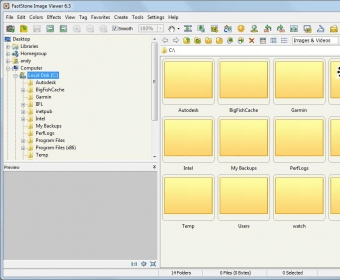
Faststone Image Viewer is an advanced image-browsing tool that lets you optimize, convert and manage your images and photos easily. A thumbnail preview on the right-hand side of your screen and a folder tree at the top left may remind you of the initial versions of ACDSee’s image viewers, which made image management such an enjoyable task.

Faststone Image Viewer has all the features that perfect imaging tools usually have. You can resize, crop, rotate, and flip any number of images in minutes using this tool. You can also perform basic image editing (like adding text and shapes to the images) or use the built-in slideshow tool for previewing your edited images without moving a bone.

For your last night party photos, the program has a masking and framing tool that lets you add stunning frames and borders to your images. Using the built-in strip creation tool, you can create vertical or horizontal panoramas using your own images. There are many other features, like color settings, black and white effects, and brightness settings, to give your images a professional touch.

In addition to all these features, a built-in batch image renamer and converter gives you everything you may need to process your images directly from your camera, ideal for web publishing or sharing with your friends.
  • Easy to use.
  • Multiple features for a complete management of your images.
  • None.

Reviewed by: Jasminder Singh

Reviewer rating:

Reviewed: Last year

What's new in version 4.2

Now it is possible to batch convert images into PDF files.
Enhanced the magnifier.
Optimized the loading speed of Windowed View .
Fixed some bugs introduced in version 4.1.
Other minor improvements.

What's new in version 3.8

This version adds ability to set the number of copies for printing and also includes new tools for drawing on the imagery, fixes, optimization.

What's new in version 3.7

. Now you can preview the batch conversion by clicking the "Conversion Preview" button.
. Improved magnifier to view large images faster.
. Many other updates with some bugs fixed.
Report a wrong version Report a wrong program title Suggest a correction

Screenshots

Main window Main window Panorama maker Panorama maker Main window Main window Framing tools Framing tools
All 29 screenshots

Latest comments

maryketty(beginner) 2 years ago 
i like this faststone because i can cut and adjust my personal photos without losing colours and all.sorry that i cant explain in photo terms but i love it thank you
Reply
brokenhead(beginner) 3 years ago 

This is a 5-star program. Best out there.
Reply
Softy(beginner) 3 years ago 
This program is free but it is as powerfull as other soft you pay a lot of.
Is difficult tell you all the features, some of them are:
Supports all major graphic formats (BMP, JPEG, JPEG 2000, animated GIF, PNG, PCX, TIFF, WMF, ICO and TGA) and popular digital camera RAW formats (CRW, CR2, NEF, PEF, RAF, MRW, ORF, SRF and DNG).
True Full Screen viewer with image zoom support and unique fly-out menu panels
Image modification tools: Resize/resample, rotate/flip, crop, sharpen/blur, brightness/contrast, etc.
Image color effects: gray scale, sepia, negative, Red/Green/Blue adjustment
Image special effects: watermark, annotation, drop shadow, framing, bump map, lens, morph, waves
Image management, including tagging capability, with drag-and-drop and Copy To/Move To Folder support
Histogram display with color counter feature
Compare images side-by-side (up to 4 at a time) to easily cull those forgettable shots
Slideshow creation with 150+ transition effects and music support (MP3, WMA, WAV...)
Create efficient image attachment(s) for emailing to family and friends
Create fully configurable Contact Sheets - just like the pros (and save $$$ on ink)
Acquire images from a scanner
Versatile screen capture capability
Create a no-install fully portable version of the program which can be run from a removable storage device
And more, more, more....
AND ALL FREE
Reply
Add new comment All 4 comments

E-mail Address:

Password:

Register now »

Forgot password?

Sign in with:
.bmp FastStone BMP File
.psd FastStone PSD File
.png FastStone PNG File
.jpg FastStone JPG File
.gif FastStone GIF File
Download Software Informer Client
What do you need JPEG for?
Do you know the meaning of JPEG abbreviation? JPEG was named after the Joint Photographic...
All articles
Copyright © 2012, Informer Technologies, Inc. About| Privacy and terms| Help| Feedback & Support| Partners program